Showing posts with label Scratch Live. Show all posts

Tuesday, 29 November 2011

Getting Creative With Serato Scratch Live

We tend to focus a lot on Traktor in our controllerism articles because of its simpler and more flexible controller mapping capabilities, but there are a fair few hidden – or at least, subtly introduced – features that make controllerism in Scratch Live a lot of fun too. While many “Serato” djs may stick to the basic 1 +1 deck paradigm, there are now a lot of additional tools that allow for tinkering if you are so inclined. 
Serato appears to have made a conscious decision to make mapping MIDI controllers simple, and it is somewhat at the expense of power. For instance, mapping a MIDI control to more than one Scratch Live function isn’t possible… but to mitigate that, Serato have integrated the Super Knob and Ultra Knob concept. They’ve also made it impossible to map buttons to dials and vice versa, but their way of working provides a loose workaround for the effects you might want to achieve by performing such a thing.
Important! Before you start, go into the MIDI page of the setup window and create a new MIDI preset. After you’ve made changes, save. If you don’t do this, all your hard work will be lost when you quit. Not fun.

BUILT-IN SMARTS

Scratch Live’s effects sit somewhere between Traktor’s group and advanced modes, with two assignable banks of three effects that can each be expanded to show their advanced controls. So, whilst Scratch Live only has two banks maximum, each bank has three effects that are always highly configurable – here are some advanced tips for creating effects behaviours.
The super knob concept allows you to create relative relationships between an effect’s main dial and its advanced parameters. The ultra knob goes a step further and allows you to create the same relationships between the three main effect knobs and an ‘omni knob’ for each bank. Here’s how:
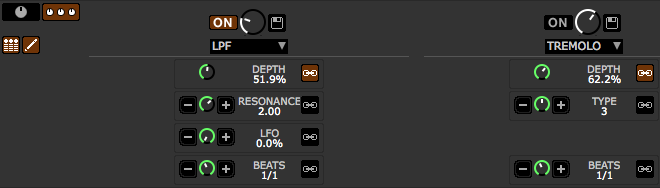
  1. Click the expand button (pictured) to show an effect’s advanced controls.
  2. Now, press the newly visible pencil button, which will open up the relationship controls.
  3. Move the dial to where you want it to be when the main dial is fully anticlockwise (‘off’) and press the ‘-‘ button.
  4. Now move the dial to where you want it to be when the main dial is fully clockwise (‘on’) and press the ‘+’ button.
  5. Make sure the link button is engaged.
Now when you turn the main dial, the advanced dials will turn the amount you’ve set up. If you set the controls to the opposite of the main dial – so that the advanced dial turns clockwise when the main dial turns anticlockwise – then the ring around the dial will be red instead of green.

PUSHING THE ENVELOPE

The super knobs and ultra knobs are obviously very powerful, but using Scratch Live’s native capability we’re limited to just one super knob per effect or one ultra knob per bank. If we use our MIDI intermediary software we can create as many as we like.
In testing, I learned two things about how Scratch Live treats MIDI input. Firstly, it’s got no issue with commands coming in simultaneously and so we don’t have to worry about creating delays between our message splitting. Secondly, it won’t learn the second in a string of MIDI commands even if you do put a delay in, so it’s necessary to build the MidiPipe template up with these steps:
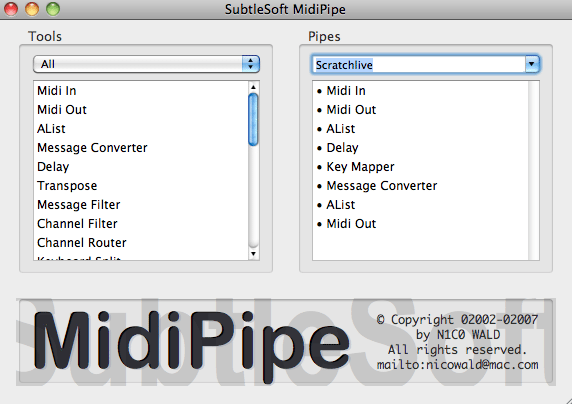
  1. Set up a MIDI in in your MIDI software.
  2. Set up a MIDI out to go to ‘Scratch Live MIDI in’ in the software, and ensure that ‘pass through’ is enabled.
  3. ‘Learn’ the first command in Scratch Live.
  4. Add a message converter, change the CC of your control to something else (it’s a good idea to plan out what you’re doing to avoid a mess down the road) and put it after the first MIDI in in your MIDI software.
  5. Now that the control has been switched, go back to Scratch Live and learn the next command.
  6. Return to the MIDI software and move the message converter to the end of the pipe, adding another MIDI out after it.
  7. For extra controls, repeat from Step 4.

THE NON-EFFECT EFFECTS

Scratch Live doesn’t count censor or loop roll as effects – this means that they can be used without taking up a slot in your DJ-FX rack. Whilst that’s all good, it also means they can’t be hooked up to super or ultra knobs, and so if we want to use them to their full potential we need to get a little creative with MidiPipe or the equivalent.
Here’s a trick that, whilst not super new, may have passed you by: instead of mapping a single loop roll button, you can map as many as you like to individual loop roll lengths by pressing ctrl+alt+click on the loop button in MIDI mode.
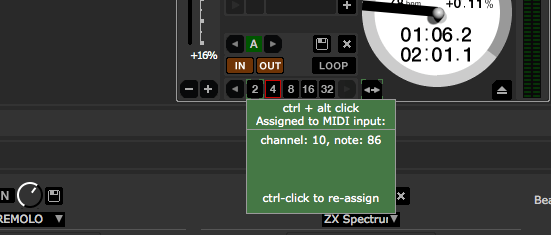
In a similar shortcut to the loop roll trick mentioned above, you can also ctrl+click on the effects activation buttons to turn them into momentary triggers. Try assigning loop roll activation and effects activation to the same button by creating a basic key mapper MIDI pipe and using these hidden momentary press controls for some very cool effects!
As a final note, because censor’s a button and Scratch Live doesn’t allow buttons to be triggered by specific values of CCs, we have to do some jiggery pokery in our MIDI software and turn our CC message into a note message. I use MidiPipe often because it’s very quick and easy to use, but when it gets to the more complicated actions, Bome’s Midi Translator Pro is the way to go. What we need to do is tell Midi Translator to turn only the final value on a single CC message (127, or 7F in hex) into a note on message, and also that the next one below (126, or 7E in hex) into a note off message. This will allow us to create a knob that can be assigned as we wish, but at the very end of its throw also sends things into reverse!

Tuesday, 20 September 2011

Scratch Live VS Traktor Scratch: The 2011 Update


Saw this over @ Tech Tools thought it might interest y'all............
The last time we did a comparison between the two juggernauts of the DVS world feels like a lifetime ago. Considering that each side is sporting both new hardware and new software, it seems apt for us to revisit the debate and update the situation.
On one hand, we’re not going to reinvent the wheel today – many things from our mid 2010 piece hold true so there’s little need to restate them. That said, since our last article Traktor’s undergone a major release and now boasts a new look, sample decks, and yet more effects. Scratch Live remains at version 2, but a couple of point releases have tightened up performance, added effects and further extended the super knob concept with ultra knobs and advanced macro mapping. Let’s dive in!

CLASH OF THE BOXES


One of the biggest updates is the audio interfaces on offer, with both sides getting a refresh. In this generation, Native Instruments offer a choice between two audio interfaces with the Audio 6 and 10, superceding the 4 and 8, Rane between three with the discontinuation of the SL1 and the introduction of the SL2 and SL4.
Rane’s interfaces feel like they’re built to withstand a beating, and their matt black industrial design means you won’t shed a tear if they take a couple of bumps. Native Instruments’ offerings don’t feel any less sturdy and the SL2 and Audio 6 and SL4 and Audio 10 are roughly the same weight, but the lightly brushed steel and high gloss black plastic fascia are liable to tempt you into carrying a cleaning cloth in your DJ bag. Of course, which style you prefer is an entirely personal decision – but a design aspect that I think really works is Rane’s decision to put ins and outs on opposite sides of the box rather than right next to each other, which is really handy in stressful changeover situations.
Something slightly more involved, however, is the feature comparison between the NI and Rane Serato products. Because Scratch Live just comes in one flavour, it doesn’t matter which box you get when it comes to software features (except for physical number of decks supported) – unlike NI, who have Traktor Scratch Duo for people who buy the Audio 6 and Traktor Scratch Pro for those who opt for the Audio 10. Of course you can upgrade Duo to Pro, but that then impacts the buy in price.
Traktor Scratch Duo with the Audio 6 is the lowest price of the pile, closely followed by the Rane SL2. Both have two DVS enabled phono/line ins and outs, but the Audio 6 also has an aux in/out to complement them. To get the same number of connections from Rane you need to jump up to the SL3, but that sits at the same price point as the Traktor Pro enabled Audio 10, which gives the SL3 a sound thrashing when it comes to features: four DVS enabled ins/outs plus a fifth aux channel with optional ¼” mic input and 5 pin MIDI I/O. Rane’s cream of the crop, the SL4, features five inputs and two USB sockets which allows two computers to share the inputs or hot swap between them – considerate clubs could install one of these for the ultimate in Scratch Live convenience, and the colossal price tag indicates this might be Rane’s target market.

AUDIO QUALITY AND LATENCY


When it comes to sound quality, it’s a dead heat. Pushing the same track out of the Audio 10 and the SL4 into a mixer, I couldn’t hear a difference. The SNR of the NI cards is marginally higher, so to get the Rane interfaces to equal volume requires a miniscule gain tweak on the mixer, but clarity and sound reproduction differences aren’t so much subjective as they are conjecture: I consistently failed to identify which was which in a gain adjusted blind test, even when pitting the NI card’s 96kHz mode against the Rane’s 44.1kHz (although the SL4 also supports 96kHz). There’s a subtle difference in sound that I could probably train myself to identify, but the important part is that objectively the two manufacturers’ interfaces don’t sound better or worse than each other. Arguments for higher resampling rates are better placed when it comes to internal mixing and playback effects, and the jury’s still out on whether it makes a perceptible difference in the real world.
Input quality is the same.  There’s nothing really in it, and although NI’s Audio 10 features a nice sounding mic input and its MIDI I/O make it a better fit for part timing as a production interface, at a pinch I’d be happy to use either and any to record audio.
As you might expect, there’s not a hair between the two camps when it comes to latency. We’ve gotten to the point where modern computers have the grunt to drive tiny buffer sizes and interface manufacturers are squeezing the last drop of leeway out of internal efficicency, so differences are so miniscule that for real world application they’re not there. It should be suffice to say that whether you go for Traktor or Scratch Live, you’re getting excellent, responsive performance.

INTEGRATION


Both pieces of software have a constantly expanding list of devices that plug and play with native mappings, and although we’ve been over the difference in the styles between Traktor and Scratch Live’s mapping systems, something we didn’t touch on before that counts in Traktor’s favour is the Native Instruments developed NHL, a proprietary interface for NI controllers and Traktor that allows for around four times the resolution of MIDI. It’s currently put to use by NI’s Kontrol range, and Scratch Live doesn’t really have an answer right now.
We’ve also seen a clash in the certified mixer world, principally between Rane’s Sixty Eight and the Pioneer DJM900 nexus. If anything, the DJM900 is the more likely candidate for club installs due to Pioneer’s existing stronghold on big club DJ booths, but they’re both very impressive beasts that our separate reviews (Pioneer here and Rane here) go into extensive detail on. The Rane TTM57SL finally sees some competition in the form of the Pioneer DJM-T1, too.

SAMPLE WARS


Traktor’s sample decks are very different from Scratch Live’s SP-6 sampler, and each methodology has its pros and cons. Scratch Live excels in number of available samples (four banks of six are available) and benefits from a separation from the decks, whereas Traktor’s integration of sample decks into the actual mixing paradigm makes it easier to send loops into sample decks for a continuous mixing experience. We love being able to save a battery of samples in Scratch Live, enabling us to load up a drum kit for some live beatmaking, but at the same time Traktor’s loop recorder is a mean feature for live remixing. Which one you prefer will depend largely on your mixing style; I find Serato’s approach to fit in better with a hip hop mentality, whereas NI’s is very smooth and suits electronica perfectly.

EFFECTS


Traktor 2 added some more effects to NI’s massive list, and Scratch Live refined the Super Knob principle even further with Ultra Knobs. Ultra knobs are essentially single knobs that control three super knobs, giving huge power to a single dial. For all this power though, and indeed even Traktor’s new effects, the big differentiator between the Scratch Live and Traktor effect is the Traktor mapping system’s modifiers. The capabilities of the Traktor mapping system enable the weird and the wonderful customisations that DJ TechTools has been developing over the years, and honestly speaking even though Scratch Live is making excellent progress, Traktor’s effects are where the real power is.

THE BOTTOM LINE


One place that NI definitely takes a victory is in the audio interface standoff. The Audio 10 is a great card with a plethora of ins and outs that Rane just can’t match. That said, the two USB inputs on the SL4 is a great idea that NI hasn’t got an answer for.
NI has also given Traktor a real boost with the sample deck concept, but like so many differences between Traktor and Scratch Live, it’s play style that will really decide whose methods you prefer – and that includes the controller and effects implementation. Like we’ve said before, it’s likely that one or the other will just seem to make more sense. One thing we will say is that whilst NHL counts in Traktor’s favour, we think a standard that hardware and software manufacturers can agree on is, in the end, better for the consumer.